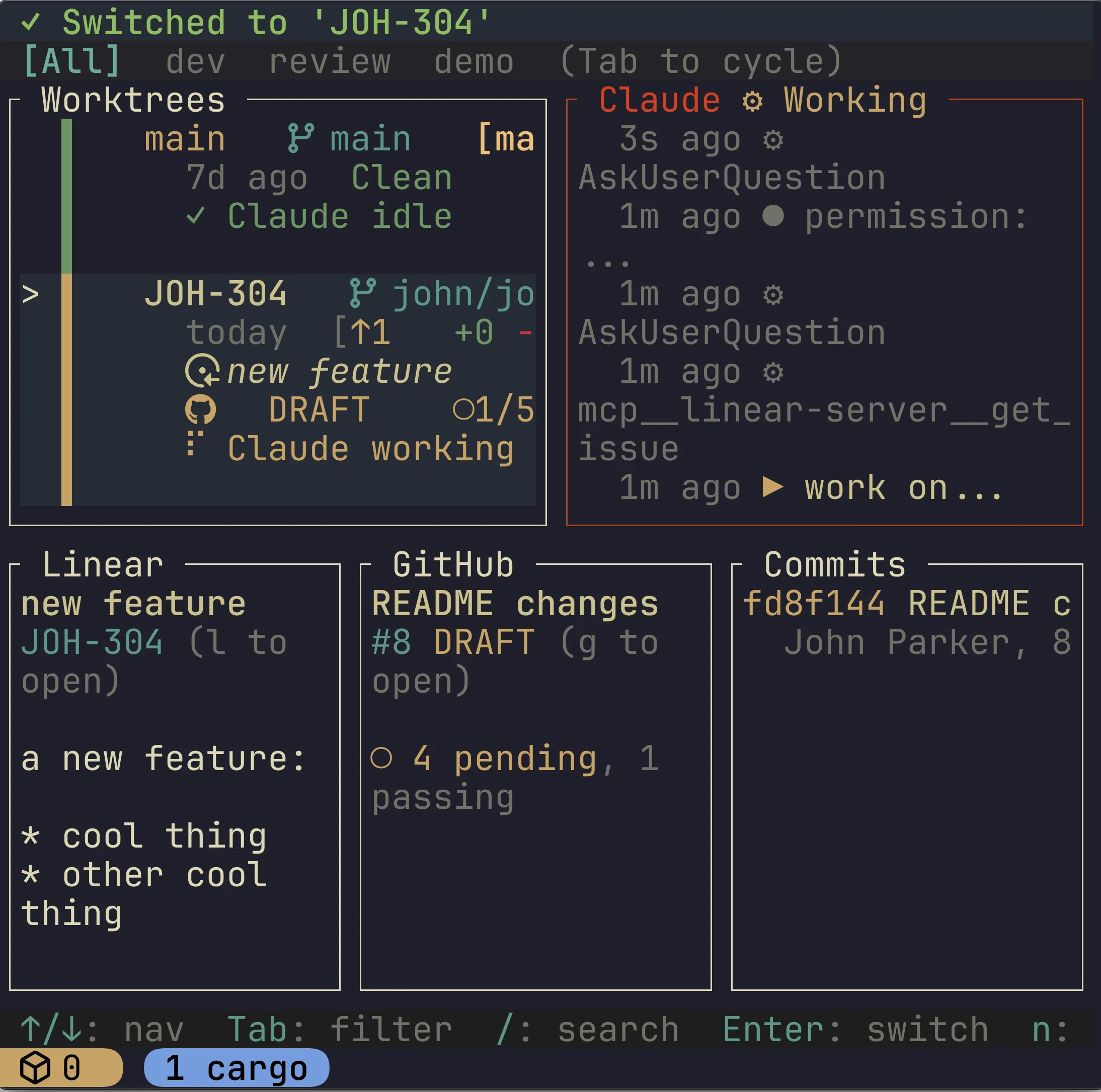
Creating Loom
I recently created Loom, a TUI control center for managing Git worktrees and integrations with Claude Code, GitHub, and Linear. Loom consists of 16,615 lines of Rust and 221 commits in its initial 0.1.0 release. I developed it in one week in my spare hours.
I’ve never read a single line of code in Loom. It was developed 100% with Claude Code and Opus 4.5. I barely even know Rust, and it didn’t really matter. I chose Rust because it’s a fast systems language well-suited for TUI and CLI tools, and the rigorous compile-time errors create a nice agentic feedback loop for LLMs.
200+ commits and 16k+ lines of code - surely the codebase is a joke and the application is hopeless! And yet, it’s actually quite serviceable and is exactly what I was looking for in a worktree TUI tool. I can create, delete, and merge worktrees on the fly; I can navigate to tmux sessions per worktree; I can see Claude Code logs via command hooks for realtime agentic development; I can see remote GitHub PR status checks and comments; and I can see the Linear issue text for the worktree - all in one TUI.
Loom was an experimental project for me, to see what it would be like if I fully “let go” looking at the code LLMs write and simply iterate through natural language. Somewhere around commit 100, I started using Loom itself to develop Loom by launching multiple agents in parallel worktrees, pulling in specs and requirements from Linear. The emergent workflow looked something like this:
- Create issues in Linear for features and bugs. For each issue, I write detailed requirements in the description
- Use Loom to create a new worktree off of
mainand start a Claude session with prompt “work on LIN-123 /plan”. What it means to work on a Linear issue is defined in an Agent Skill. - Launch multiple worktrees targeting multiple Linear issues, up to some number that I can mentally “juggle” in my head.
- Loom lets me quickly navigate to tmux sessions running claude for each worktree in development
Prior to Loom, I generally stuck to a single Claude Code session, and always reviewed the code. Running multiple sessions in parallel felt counter productive: how could I context switch and code review across disparate features? It would almost always be slower than implementing those features in serial, as context switching cost extra time.
But with Loom I was able to cross some new threshold that I still feel genuinely uneasy about. I started launching multiple agents in parallel, and stopped looking at code. As I switched between a handful of worktrees, I caught myself having to remind myself what I was even working on in that worktree, as my mind dashed from one concept to another. Because I was not invested in the code anymore, each feature felt more distant mentally than they used to.
Did I give in fully to the vibes? Am I still doing software engineering here?
Vibe Coding or Engineering?
You don’t get to 16k lines of Rust and a functional, non-trivial product with just vibes. It was 221 commits, but each one developed with a thoughtful, detailed prompt, often reinforcing technical details and architectural guidelines. This still resembles engineering!
For example, here is a Linear issue “Improve configuration options”
- Enable/disable:
- linear = requires API key / linear section in config toml. Enables ‘l’ Linear in TUI
- github (requires gh) + enable in config toml. Enables ‘g’ github in TUI.
- vim diff = requires nvim DiffView. Enables ‘d’ diff in TUI
- direnv, dotenv, claude settings copying over should be set by config (non-committed files to copy to worktree)
- worktree location (default to
~/.worktrees(not~/worktrees)- Make sure all settings can be set by user global, and override per project
- Let’s make sure we’re centrally storing config options on application launch - a config manager should centrally manage all config options, combining user-level config + override project-level config + override worktree-level config
There are some hints throughout that help get a better software implementation of a new centralized config manager.
And then there is the importance of CLAUDE.md memory. It was critical to have key architectural guidelines and best practices documented. For example, early on in development Claude liked to introduce blocking I/O calls on TUI navigation events, degrading the user experience. I knew I needed these calls to be async, so I had Claude reinforce in its memory to remain async:
The codebase uses async for external I/O but keeps the TUI event loop synchronous:

- **Async**: API calls to Linear, GitHub; worktree stats loading; cache file I/O
- **Sync**: TUI event loop, simple git2 operations, config loading
- **Pattern**: Dashboard spawns async tasks for data loading, polls for completion in the render loop
- **Rule**: Never `.await` in the TUI event loop - it blocks rendering and input handling
- **Worktree refresh**: Use `trigger_stats_refresh()` to reload worktree data asynchronously; this chains into cache loading automatically

When adding new connectors or API calls, follow the existing pattern in `tui/dashboard/data.rs`.

**Documentation convention:** Modules in `src/tui/` have doc comments marked with "Thread Safety: SYNC ONLY" or "Thread Safety: Background Thread Functions" to clarify which functions can block. A pre-commit hook enforces no `.await` in TUI code.
Lo and behold, Claude generally stopped introducing blocking operations in the main event loop.
Claude would not always succeed on solving a problem on the first try, either due to its own mistake, or because I realized something that didn’t occur to me when writing the initial spec in Linear. This required repeated prompts. An issue that occurred was a growing sense of “code rot”: I could feel the quality of the codebase worsening with every new prompt, just by looking at the code as it flew by in Claude. The engineer in me wanted to review the code, but I took a different approach.
First I reinforced exploration and inquisition using a linear agent skill:
---
name: loom-linear
description: When asked about Linear issues, tasks, or projects, or when LIN-<number> is mentioned
---

# Linear

Linear is project management software for tracking issues and tasks. Issues move through a Kanban-style board and each has an ID prefixed with "LIN-" (e.g., "LIN-163").

Use the Linear MCP server tools to interact with Linear.

## Working on an issue

1. Review the issue description using `get_issue`, along with any user input
2. Explore the codebase to understand the context
3. Ask clarifying questions if requirements are unclear or multiple approaches exist
4. Implement the solution
This is fairly basic, but generally helped with producing better plans. For more complex issues that required multiple prompts, I also started using an align agent skill. This skill would freshly review all changes made in this worktree thus far using 6 phases and parallel sub-agents that check for alignment with the codebase best practices and architectural decisions.
---
allowed-tools: Bash(git diff:*), Bash(git status:*), Bash(git log:*), Bash(cargo test:*), Bash(cargo build:*), Bash(cargo clippy:*)
description: Review code changes for alignment with project standards (tests, CLAUDE.md, architecture, cleanup)
---

# Align Command

Review the current branch's changes against main for alignment with project standards.

[...]

### Phase 1: Precondition Check

Launch a haiku agent to check:
- Are there any changes vs main? (if not, stop)
- Is this branch trivial (single typo fix, config change)? Note but continue.

If no changes, report "No changes to align" and stop.

### Phase 2: Context Gathering

Launch a haiku agent to:
1. Read the CLAUDE.md file at the repo root
2. List all files changed in this branch vs main (`git diff main...HEAD --name-only`)
3. Note any directory-specific conventions from CLAUDE.md

### Phase 3: Change Summary

Launch a sonnet agent to:
1. View the full diff (`git diff main...HEAD`)
2. Summarize what changed at a high level
3. Categorize: new feature, bug fix, refactor, enhancement, etc.

Return the summary for use in Phase 4 prompts.

### Phase 4: Parallel Review

Launch 4 agents in parallel. Each agent receives:
- The change summary from Phase 3
- The relevant CLAUDE.md sections
- The list of changed files

Each agent returns issues with confidence scores (0-100). Only report issues with confidence >= 80.

**Agent 1: Test Coverage Reviewer (sonnet)**
[...]

**Agent 2: CLAUDE.md Compliance Reviewer (sonnet)**
[...]

**Agent 3: Architecture Reviewer (opus)**
[...]

**Agent 4: Code Cleanup Reviewer (sonnet)**
[...]

### Phase 5: Issue Validation

For issues flagged with confidence < 95 by Architecture or Cleanup agents:
- Launch parallel opus subagents to validate
- Each validator gets: issue description, relevant code context
- Validator confirms (true positive) or rejects (false positive)

Filter out rejected issues.

### Phase 6: Summary and Actions

Compile validated issues into structured summary:
[...]
This would often catch issues that slipped through the cracks, even if CLAUDE.md documented best practices.
Together, planning and alignment helped avoid code rot over many developed features, ultimately up to the 16k lines in the current release. How much further would this strategy work before falling apart in a larger project? 100k lines, 1M lines? If not today, how about next year? I suspect the window will keep shifting, rapidly.
How long until this Loom workflow is obsolete?
If you consider tools like Steve Yegge’s Gas Town, you might wonder: is Loom as a workflow obsolete in the near future? My primitive human brain can only juggle a handful of worktrees at a time - surely a swarm of agents with an orchestrator can do better than me! Moreover, I intentionally avoided working on issues that overlapped one another: I didn’t want to deal with the merge conflicts! But surely a swarm of agents and an orchestrator can be more efficient than me - through cross-communication and a merge conflict resolver.
In Yegge’s “8 Stages of Dev Evolution To AI”, Loom would be classified as stage 6 (CLI, multi-agent, YOLO), and capable of stage 7 (10+ agents, hand-managed). But stage 8 (building your own orchestrator) is something beyond what Loom and I are trying to do. Should I too jump to the next stage? What does engineering mean at that stage?
This is uncharted territory. My feeling is that in due time, I will have to embark into that territory and discover what my role within it will be. My early thoughts:
- The orchestrator could handle both planning and alignment for multiple issues, delegating tasks to worker agents
- The orchestrator can review and align worker output, and choose when to merge them and deal with merge conflicts on its own. In Loom, I have to decide when to merge - what a waste of time!
- The orchestrator can decide to file its own bug reports or features based on the developed work. These can be surfaced to the human for review, or quietly implemented behind the scenes.
- At this point, software engineering becomes writing tasks, specs and roadmaps in some issue tracker like Linear. Just feed the issues into the swarm! And iterate
Is this still engineering? Or has the engineering intelligence fully shifted into the agent swarm? I’m not so sure. I suspect this system will end up working surprisingly well in the not-so-distant future, and us software engineers will have to find our place in that system. Increasingly I think what actually matters is deciding what to build, and injecting creativity, design, and joyfulness into that product.
Tools similar to Loom
There are many: automaker, Auto Claude, Maestro, Conductor, Vibe-Kanban, Grove
But it raises a question - if anyone can create their own tool with relative ease, why not create your own? After all, you can tailor it to meet your exact requirements and desires. Today it takes a week to make that tool. How long will it take to make it in 1 year? 3 years?